
Guidebook management
Managing welcomebooks is easy
See how easy it is to manage multiple welcomebooks, share them by link or QR code, rotate PIN access, and keep every property guide current.
By welcomebook editorial team · Updated September 2, 2026 · 7 min read
A digital welcome book should remove repetitive work, not become another document to maintain. The right workflow gives every property one current guide, one dependable link, and clear controls for sharing, access, and updates.
PIN protection controls access to the information inside a welcomebook. It does not replace a physical lock, smart-lock code, or the security tools provided by a booking platform.
Key takeaways
- ✓ Manage every property from one dashboard while keeping unit-specific details separate.
- ✓ Share a stable guest link in scheduled messages or let guests scan its QR code.
- ✓ Rotate a guide's PIN between stays without rebuilding the guide or changing its URL.
- ✓ Edit one current source instead of sending guests outdated PDFs and message attachments.
- ✓ Add better instructions and recommendations whenever guest questions reveal a gap.
One dashboard for every property
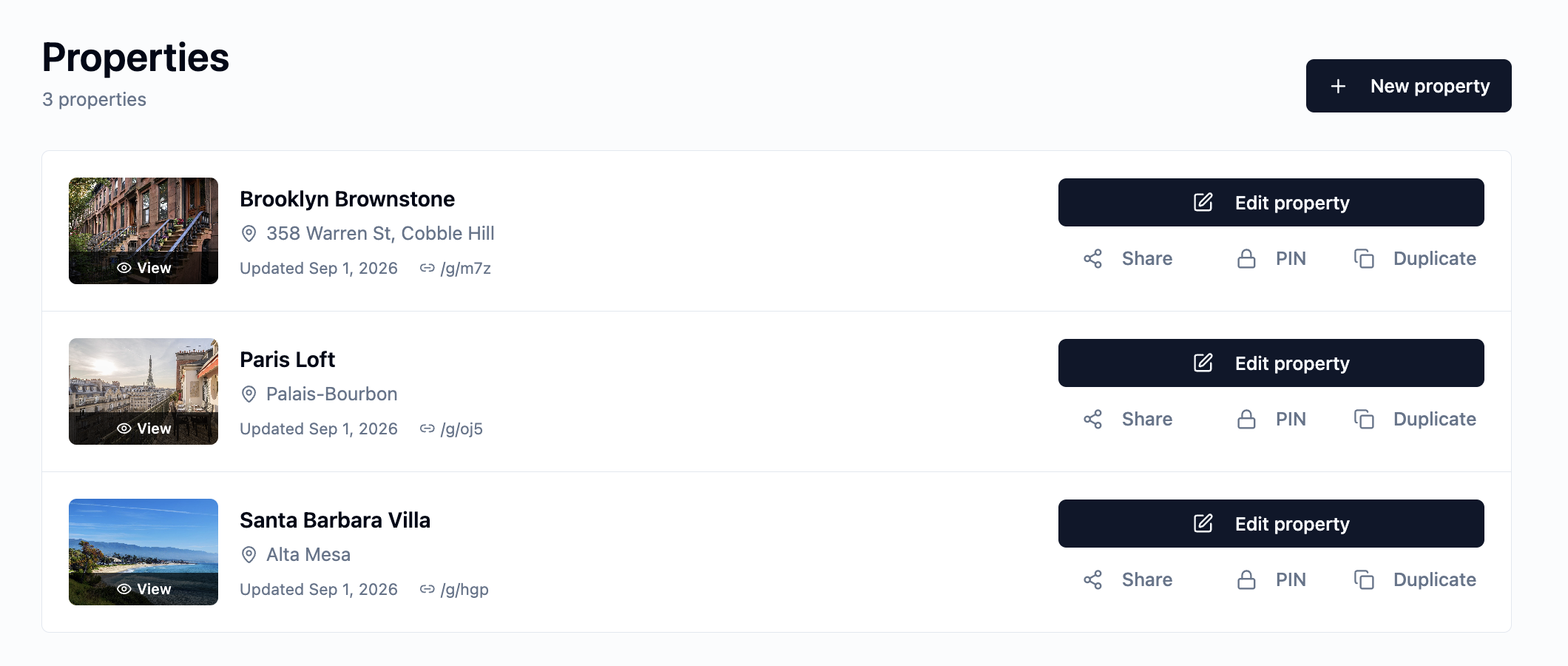
The welcomebook dashboard gives each property its own row, preview, link, and management controls. A host can open the guest view, edit the property, share it, manage its PIN, or duplicate it without searching through folders or old message threads.
This is especially useful for hosts with several apartments. Each unit can have its own welcomebook and guest link, so arrival instructions, Wi-Fi details, and access information do not get mixed together. The dashboard still keeps the full portfolio visible in one place.
Give each apartment its own guide
For a multi-unit building, create one complete guide first and duplicate it as a starting point for the other units. Shared building access, neighborhood recommendations, emergency contacts, and general policies can carry over. Then replace anything that differs by apartment, including the unit number, entrance route, lock instructions, Wi-Fi credentials, appliance notes, and parking space.
Every unit receives a distinct link that can be placed in the correct automated arrival message. This avoids asking guests to choose their apartment from a general guide and reduces the risk that someone follows instructions intended for another unit.
- ✓ Use the exact listing or room name in the dashboard.
- ✓ Check that the address, unit number, and entrance photo match the reservation.
- ✓ Keep access codes and unit-specific instructions out of duplicated shared text.
- ✓ Open each link in a signed-out mobile browser before sending it to a guest.
- ✓ Review every duplicated guide when shared building information changes.
Share one link wherever guests already communicate
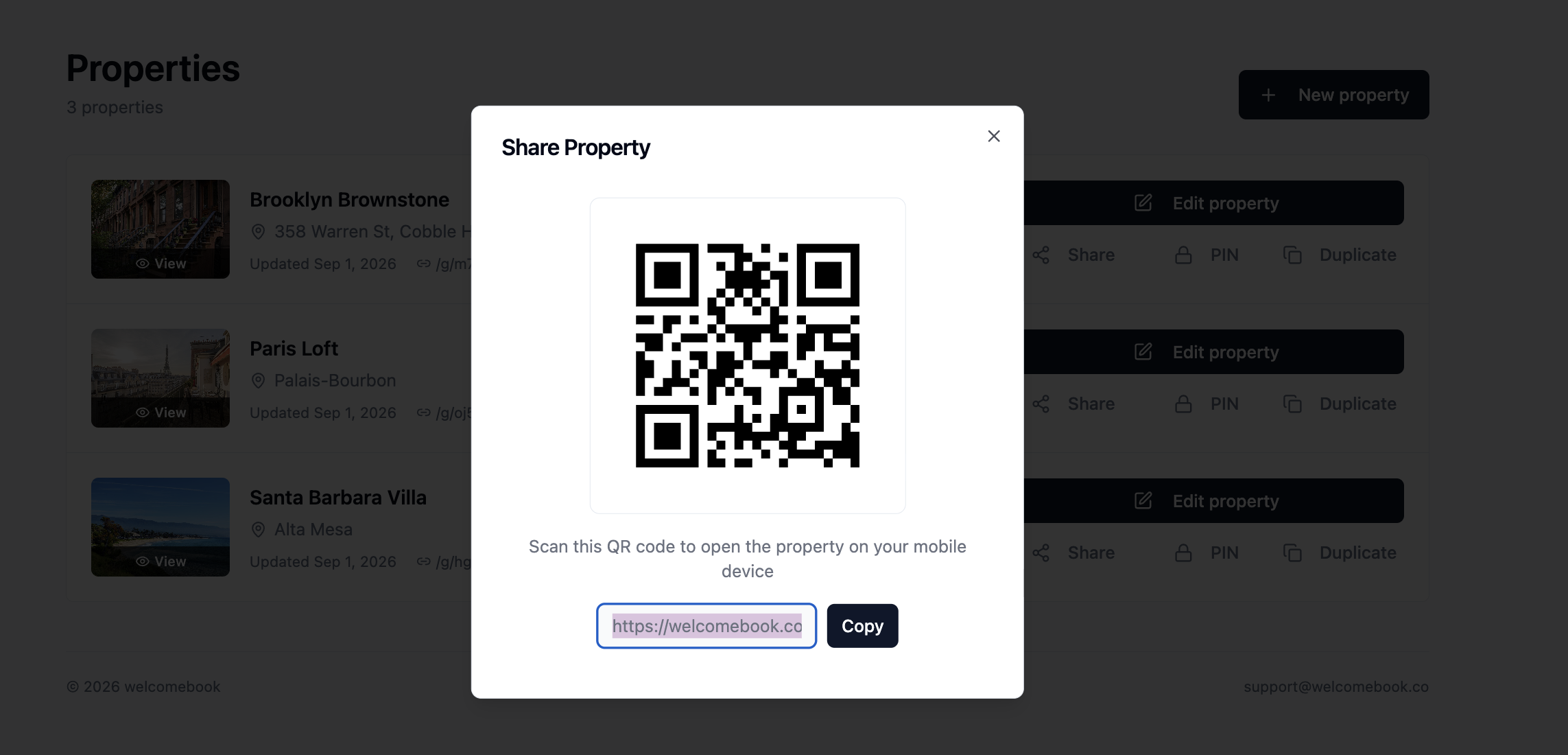
Open Share from the dashboard to get the property's current link and a generated QR code. Copy the link into a booking confirmation, scheduled arrival message, email, or text. Guests can open it before they travel and return to the same place throughout their stay.
The QR code is useful inside the property. Place it on a small arrival card, near the entry, or beside a printed backup so guests can open the guide on their own phone. Because the QR code points to the same live guide, future content updates do not require a new printout.
Rotate guide access without replacing the link
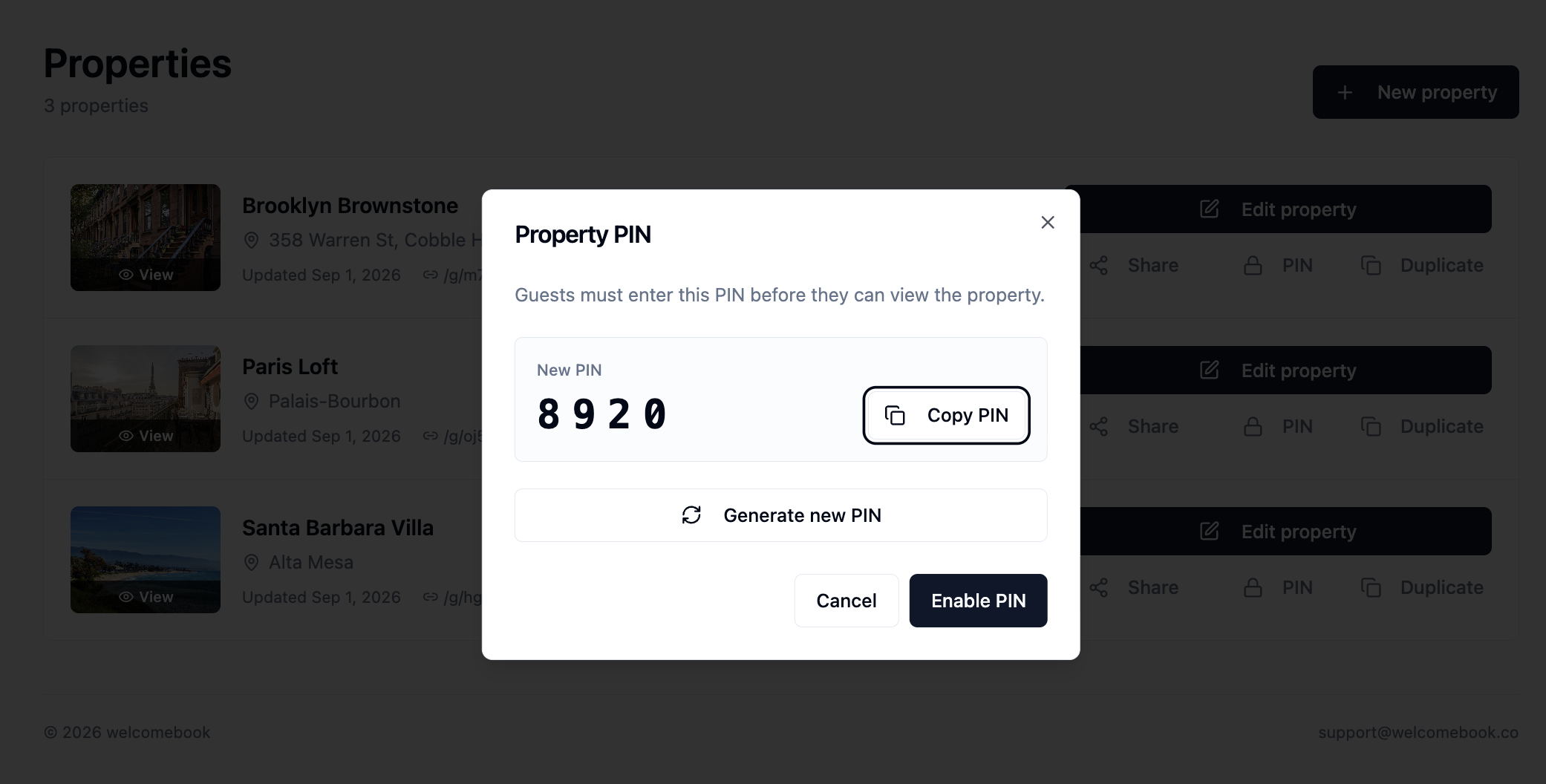
Some guides contain exact entrance directions, contact details, or other information that should be limited to current guests. Optional PIN protection places a four-digit check in front of the guide. The dashboard lets a host copy the current PIN, generate a new one, enable protection, or remove protection when it is no longer needed.
At turnover, generate a new PIN and put it in the next guest's private arrival message. The property link and QR code stay the same, which means scheduled-message templates and printed materials do not need to be rebuilt. The previous PIN no longer grants access after the change is saved.
- ✓ Send the PIN through a private reservation channel, not a public listing page.
- ✓ Rotate the guide PIN when access should change between guests.
- ✓ Update physical or smart-lock codes separately according to the property's security process.
- ✓ Test the new PIN in a signed-out browser before the next arrival.
Update the guide as the property changes
A welcomebook is a live source rather than a file attachment. When check-in steps, house information, contacts, or checkout expectations change, edit the property and save the new information. Guests opening the existing link see the current version, so there is no old PDF circulating in a message history.
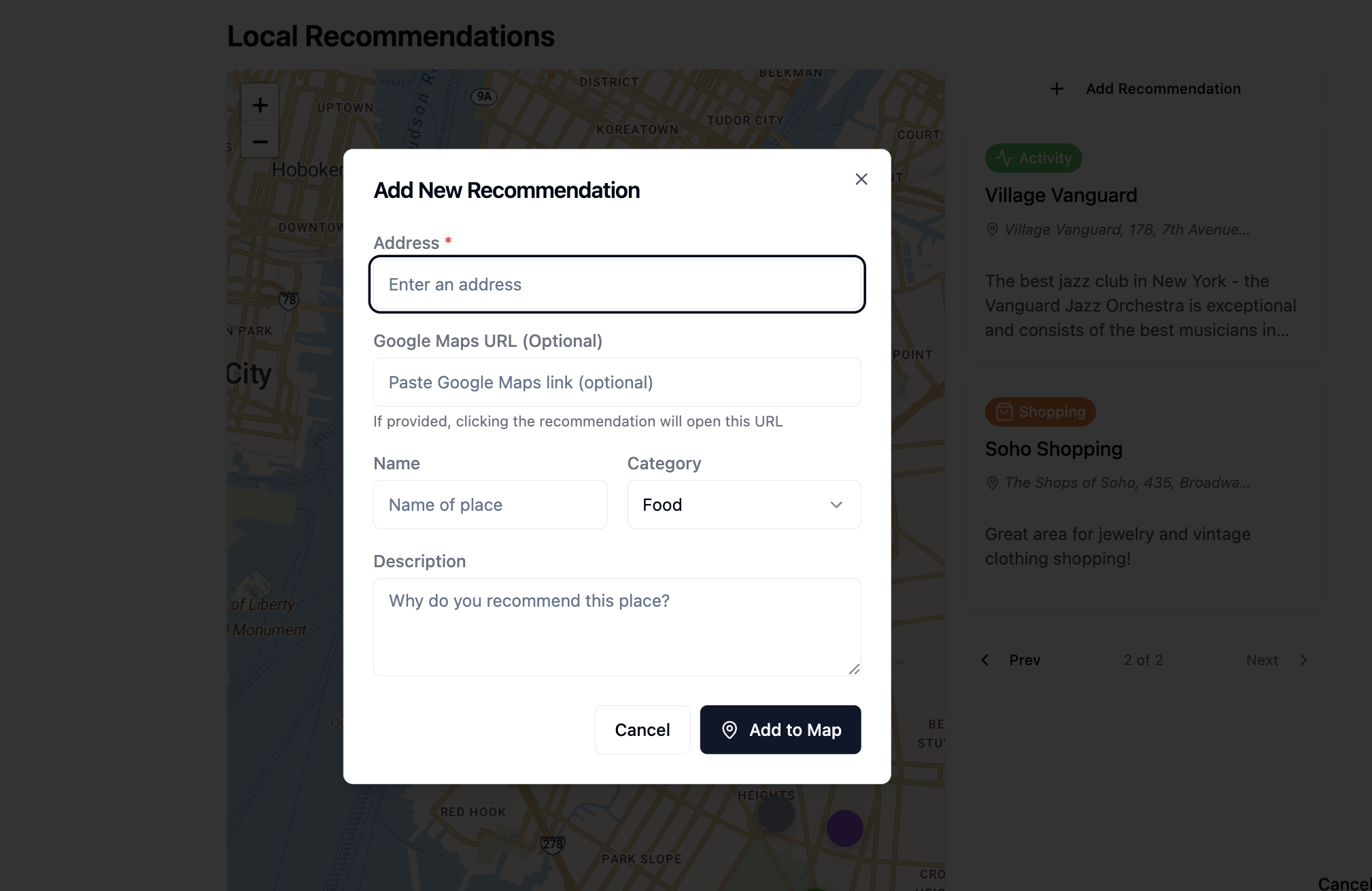
Local recommendations can grow over time too. Add the address, an optional Google Maps link, a category, and a short explanation of why the place is worth visiting. A useful description can mention what to order, who the place suits, how far it is from the property, or whether a reservation is needed.
Let repeated guest questions improve the guide
The easiest maintenance plan is to treat repeated questions as editing prompts. If two guests ask which door to use, add a labeled entrance photo. If guests keep requesting a nearby breakfast spot, add your favorite and explain when to go. If an appliance causes confusion, replace a paragraph with a few short steps.
Over time, the guide becomes more useful because it reflects real stays. Guests get answers without waiting, and hosts spend less time rewriting the same message. The goal is not to make the guide longer; it is to remove the moments that repeatedly create uncertainty.
- ✓ Review the guide after any access, policy, amenity, or contact change.
- ✓ Check map links and remove recommendations that have closed.
- ✓ Test the full guide on a phone at least once each season.
- ✓ Add a photo when a visual landmark explains something faster than text.
- ✓ Keep urgent support details easy to find and up to date.
Common questions
Can I manage multiple vacation rentals in welcomebook?
Yes. Each property has its own guide, guest link, sharing controls, and optional PIN, while every property remains available from one host dashboard.
Does the QR code change when I update a welcomebook?
No. The QR code points to the property's stable guest link. You can update instructions, photos, contacts, and recommendations while continuing to use the same link and printed QR code.
Can I change the PIN between guests?
Yes. You can generate and enable a new four-digit guide PIN from the dashboard without changing the property's link. Door locks and smart-lock codes still need to be managed separately.
Can I duplicate a guide for apartments in the same building?
Yes. Duplicate a complete guide, then replace the unit-specific entrance, lock, Wi-Fi, parking, and appliance details. Each duplicate becomes an independent guide, so shared information should be reviewed across all units when it changes.
How do guests receive their welcomebook?
Copy the property's link into the booking platform message, scheduled arrival email, or text you already send. Guests can also scan the property's QR code inside the rental.